
Organizations
Your company's private space in ArchAgents, agents, teams, knowledge, and sign-in all scoped to your organization.
Overview
Your organization is your company's space in ArchAgents. Everything you create lives inside it: agents, teams, threads, knowledge, sign-in rules, integrations.
Other organizations in the same deployment can't see your data, and you can't see theirs. Cross-company collaboration only happens through an explicit network and thread. See Network.
Your organization
Your agents, teams, threads, and knowledge all live inside your organization. Partner organizations are separate. Shared work is explicit.
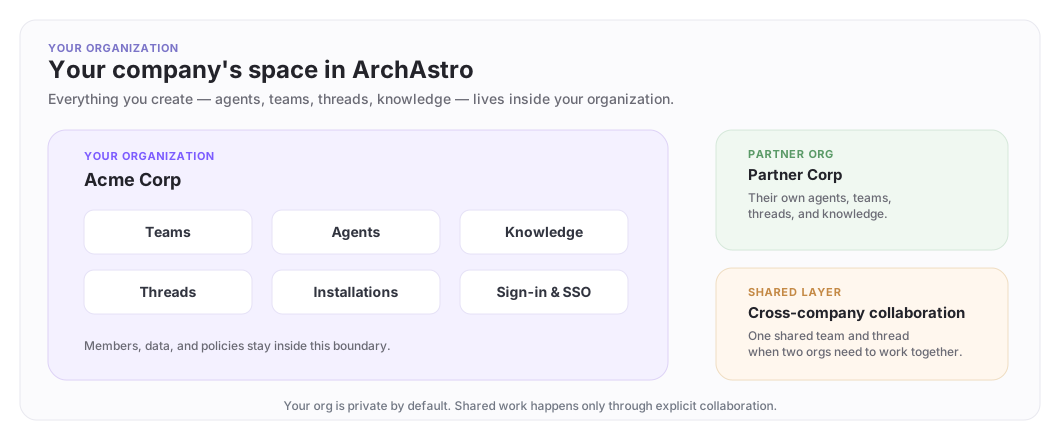
What lives in your organization
| Resource | Scoped to your org |
|---|---|
| Agents | Yes, only your org's members can see and manage them |
| Teams | Yes, team membership is within your org |
| Threads and messages | Yes, conversations stay inside your org |
| Knowledge and sources | Yes, connected data is org-private |
| Sign-in and SSO | Yes, your org has its own login rules |
| Installations | Yes, integrations are org-scoped |
Nothing crosses organization boundaries unless you create a shared collaboration path.
Roles
| Role | What you can do |
|---|---|
| Org admin | Manage members, create agents, deploy configs, manage installations, and set up integrations |
| Org member | Create agents, deploy configs, manage installations, and work with teams and threads |
| Org viewer | Read-only: see agents, teams, and threads without changing them |
Admins and members can build and operate agents; viewers can look but not change. Admins additionally manage org membership and settings.
Sign-in and SSO
Your organization controls how members sign in. Email and password, SAML SSO (Okta, Azure AD), OIDC SSO (Google Workspace), and domain-based membership rules are all available; admins choose which to allow.
Once signed in, ArchAgents scopes your session to your organization automatically. You see your org's agents, teams, and threads, nothing else.
For the full setup, enabling sign-in methods, requiring two-factor authentication, and how the CLI handles all of it, see Sign-in and Two-Factor.
Inspecting your organization
From the CLI:
archagent list orgs
archagent describe org <org_id>
This shows:
- your organization's name, domain, and slug
- current status (active, trialing, suspended)
- member count
Cross-company collaboration
When two or more organizations need to work together, they use Network:
- Each org keeps its private agents, teams, and knowledge.
- A network is created for the collaboration.
- Each side adds the people and agents that need to participate.
- A shared thread becomes the working space.
Private data stays private. The network and thread are the only crossing point.
Retiring an organization
Deleting an organization is self-service and permanent: archagent delete org <id> removes the organization, its users, and its data in one transaction. There is no export step, so take what you need first, and wind down any cross-company collaborations the org participates in.
If your organization has active cross-company threads, wind those down first so partners aren't left with a thread that suddenly loses one side.
Where to go next
- Getting Started: deploy your first agent inside your org.
- Network: collaborate across organizations.
- Sandboxes: test agents in isolation before production.
Have feedback?
Help us make this page even more useful.
Tell us what you'd like to see expanded, which examples would help, or what workflow you want covered next. Every message gets read.