
Integrations
Choose how agents connect to outside services, understand who owns each credential, and verify a connection before relying on it.
Documentation status: Beta. This section is actively being expanded and refined. Page structure, terminology, and setup instructions may change as we validate the integration workflows with more organizations.
Overview
Integrations connect an agent to a system outside ArchAgents. They provide the credential and provider-specific capabilities the agent needs to read data, take actions, or receive events.
The word integration describes the external connection. An installation attaches that connection or another capability to a particular agent. Some integrations also have a third relationship, such as a Slack channel binding, that controls where the agent participates.
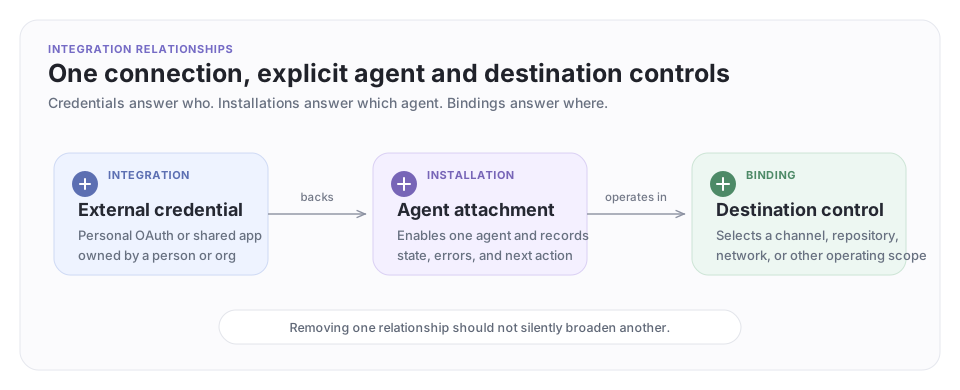
The three questions to answer first
Before connecting a service, decide:
- Whose identity should the agent use? A person's account, or a shared app/bot identity?
- Who should be able to reuse the credential? One agent, or several agents in the organization?
- Where should the agent operate? Everywhere the credential allows, or only in selected repositories, channels, networks, or other destinations?
Those answers determine the integration model.
| Model | Credential owner | Agent attachment | Good fit |
|---|---|---|---|
| Personal OAuth | One person | integration/* installation |
An agent should read and act as that person |
| Shared app | Organization | enablement/* installation on each agent |
Several agents should use one managed bot or app |
| Destination binding | Organization or network | Provider-specific binding | An enabled agent should become the resident for one destination |
A shared app connection does not automatically make every agent a participant everywhere. The shared credential, agent enablement, and destination binding are separate controls.
Supported integration families
| Integration | Models | Documentation |
|---|---|---|
| Slack | Personal OAuth, shared Slack bot, channel and network bindings | Slack |
| GitHub | Personal OAuth, shared GitHub App | Installations |
| Gmail, Outlook, LinkedIn, X | Personal OAuth | Installations |
| Zoom, Stripe | Personal OAuth | Installations |
| MCP providers | OAuth, bearer token, API key, or provider-specific credentials | Extensions & Integrations |
The available providers and installation kinds can vary by workspace. Inspect the current server before automating setup:
archagent list integrationproviders
archagent list agentinstallationkinds
Shared integration workflow
Shared Slack Bot and GitHub App connections use the same two-stage pattern:
- An organization admin connects the provider once under Settings → Integrations.
- Each agent that should use it receives the corresponding
enablement/*installation.
When exactly one matching shared integration exists, the enablement installation binds to it and activates automatically. If several matches exist, select one explicitly with --shared-integration.
archagent list integrations --provider <provider> --auth-type app_installation --org <org_id>

archagent create agentinstallation \
  --agent <agent_id> \
  --kind enablement/<provider_kind> \
  --shared-integration <integration_id>
Do not place a provider's external installation ID in the enablement configuration. --shared-integration expects the ArchAgents integration resource ID.
Personal OAuth workflow
Personal integrations belong to one agent and authorize through the person whose account the agent will use:
archagent create agentinstallation \
  --agent <agent_id> \
  --kind integration/<provider>

archagent authorize agentinstallation <installation_id>
archagent activate agentinstallation <installation_id>
The authorization command opens or returns the provider's OAuth handoff. The person completing that flow determines which external account the agent receives.
Verify before use
Treat a connection as ready only after its installation is active:
archagent list agentinstallations --agent <agent_id>
archagent describe agentinstallation <installation_id> -o json
Check these fields in the JSON response:
| Field | What it tells you |
|---|---|
state |
pending, active, paused (turned off on purpose), or error (setup or refresh failed) |
next_action |
The setup step still required |
shared_integration |
Which organization connection backs an enablement |
error |
Why the latest setup or refresh failed |
If an integration-backed tool is missing, inspect installation state before changing the agent's prompt or routines.
Permissions and safety
- Start with the smallest provider permissions that support the intended workflow.
- Use a shared bot/app when the agent should have its own identity; do not borrow a human credential for convenience.
- Attach shared integrations only to agents that need them.
- Use destination bindings to limit where an enabled agent listens or replies.
- Removing a shared integration can disable or remove every enablement backed by it. Review the affected agents first.
- Re-run OAuth when a provider token expires or when new required scopes have been added.
Next steps
- Follow Slack to install the Slack app, enable an agent, and place it in a channel or network.
- Read Installations for installation state, activation, and troubleshooting.
- Read Extensions & Integrations when a built-in provider is not the right fit and you need MCP, webhooks, custom tools, or scripts.
Have feedback?
Help us make this page even more useful.
Tell us what you'd like to see expanded, which examples would help, or what workflow you want covered next. Every message gets read.