
Installations
Attach outside systems and capabilities to an agent, inspect their state, and understand what needs attention before they become useful.
Overview
An installation is how an agent picks up an outside capability. GitHub access, a Slack workspace, a knowledge-base connector, a long-term memory store: each one is an installation attached to the agent.
The installation tells you four things:
- what's attached
- whether it's connected
- what state it's in
- what to do next if it isn't usable yet
When something an agent should be able to do isn't working, the installation is the first place to look. Its status tells you what's missing.
What one installation enables
A single installation can enable several things at once. Installing a GitHub App, for example, gives the agent:
- Tools: the GitHub builtin tools (open PR, comment on issue, read file) become available as agent tools
- Knowledge: the repositories the app is installed on become available as knowledge sources the agent can index and search
- Credentials: a scoped token the agent uses for API calls, managed and refreshed by the platform
That is why installations sit upstream of both Tools and Knowledge: one attachment, multiple capabilities. When a GitHub-backed agent can't find a repo, the first place to look is whether the GitHub App installation is active, not the knowledge source directly.
The installation lifecycle
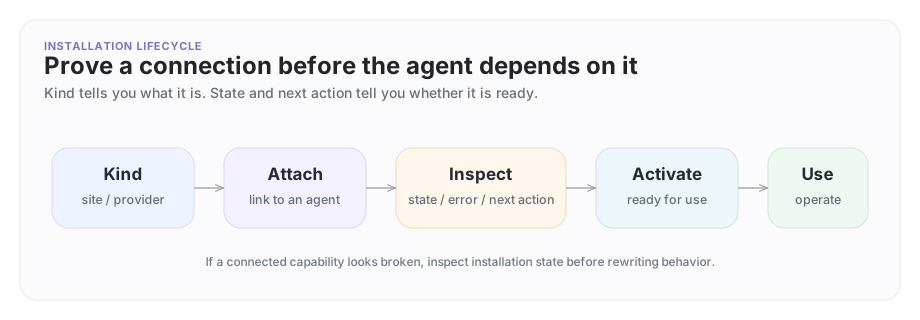
An installation starts as an attachment, moves through setup state, and only then becomes something the agent can reliably use.
A concrete example
Suppose Company A's support agent needs access to a site or provider-backed integration so it can help Company B diagnose a broken onboarding flow.
The operator path is:
- inspect the available installation kinds
- create the installation on the right agent
- inspect its current state
- follow the next action if setup is incomplete
- activate it when it is ready
This is a real lifecycle, not just one create command.
Available installation kinds
| Kind | What it connects |
|---|---|
memory/long-term |
Persistent agent memory |
archastro/thread |
Thread context and history |
integration/github |
GitHub personal OAuth (repo access, issues, PRs) |
enablement/github_app |
GitHub App (org-wide repo access, bot identity for PR reviews) |
integration/slack |
One person's Slack account; the agent reads and acts as that person |
enablement/slack_bot |
The agent joins a workspace as its own bot; reads and posts as the bot |
web/site |
Website content for knowledge indexing |
list agentinstallationkinds is the source of truth for what's available in your workspace. Kinds vary by workspace and can change over time, so always check before scripting:
archagent list agentinstallationkinds
Inspect available kinds
Before you attach anything, inspect the kinds the platform supports for the current workspace:
archagent list agentinstallationkinds
This is where you discover what categories are actually available instead of guessing from screenshots or old examples.
Create an installation
Create one for an agent:
archagent create agentinstallation \
 --agent <agent_id> \
 --kind web/site \
 --config '{"url":"https://status.example.com"}'
web/site here is a literal installation kind value, not a path. Different apps expose different kinds, so always start with list agentinstallationkinds before you script one.
Another installation kind may require provider-specific config instead. The exact input depends on the kind.
Installations are attached to agents explicitly. They are not ambient platform magic.
Inspect installation state
After creation, inspect it directly:
archagent list agentinstallations --agent <agent_id>
archagent describe agentinstallation <installation_id>
This is the command loop you use to answer:
- what state is this installation in?
- is there a next action?
- is there a provider-specific connect path?
- did setup fail?
That information is much more actionable than vague "integration isn't working" reports.
Activate or remove it
Some kinds auto-activate on create and start working immediately. Kinds like web/site, web/links, archastro/thread, and memory/long-term don't need an explicit activate step. They move directly to active when you create them.
Kinds that require external authorization (GitHub, Slack) stay in pending until you complete the OAuth connect flow, then activate:
archagent activate agentinstallation <installation_id>
activate is idempotent. Running it on an already-active installation is a no-op, so scripts that call it unconditionally after create stay safe.
If you no longer need an installation:
archagent delete agentinstallation <installation_id>
The explicit lifecycle keeps debugging and review straightforward. There's no hidden state to chase.
Org-wide integrations: configure once, bind per agent
Per-agent OAuth installations attach a credential to a single agent. Slack Bot,
GitHub App, and the other kinds that require a shared integration (enablement/github_app, enablement/slack_bot, enablement/slashwork_bot, enablement/zoom) use a different model: an org admin creates one shared
org-level integration, then each agent that should use it gets an
enablement/* installation that binds to that shared integration.
The important distinction:
integration/githubis personal GitHub OAuth for one agent.enablement/github_appis not a GitHub installation flow by itself. It is an agent-level binding to an existing sharedgithub_appintegration.enablement/slack_botworks the same way for the shared Slack bot.
For Slack specifically, follow Slack integrations for the complete workspace-install, agent-enablement, channel-binding, and reply-thread tutorials.
For agent setup, prefer the installation kind (integration/github) over a
standalone user-scoped integration record. create integration --provider github --user <user_id> creates a generic integration row; it does not attach
GitHub access to an agent by itself.
For GitHub App specifically, the org-level setup must be completed by someone who has both permission to administer the GitHub App installation in GitHub and permission to configure org integrations in ArchAgents. A user who can manage the target agent can create the agent binding, but cannot create the shared org integration unless they also have org integration permissions.
Where to enable it:
- Sign in to archagents.com as an org admin
- Open Settings → Integrations under Org settings
- Click Enable on the Slack or GitHub card and complete the OAuth flow
Behavior:
-
The OAuth callback persists a system-owned integration record scoped to your org.
-
The enablement binding resolves shared integrations in the target agent's org. Create or choose the agent in the intended org's team/user context before adding
enablement/github_app. -
Agents do not receive the shared credential automatically. Add the matching enablement installation to each agent that should use it:
archagent create agentinstallation \ --agent <agent_id> \ --kind enablement/github_app -
When exactly one matching shared integration exists for the agent's org, the enablement installation auto-binds and moves to
active. -
If it stays
pendingwithnext_action: configure_shared_integration, the shared org integration is missing, not visible to you, or ambiguous. Have an org admin finish the org integration flow first. If multiple matching shared integrations exist, list them and bind the one you want explicitly:archagent list integrations --provider github_app --auth-type app_installation --org <org_id> archagent create agentinstallation \ --agent <agent_id> \ --kind enablement/github_app \ --shared-integration <integration_id> -
Do not pass GitHub's numeric
installation_idin the--configforenablement/github_app. That config creates only the agent binding; it does not create the required sharedgithub_appintegration record. -
If direct integration creation such as
create integration --provider github_app --auth-type app_installation --org <org_id>returnsForbidden, your current session is not allowed to configure org-level app installations. Use an org admin account or the org integrations page described above. -
Per-agent OAuth integrations such as
integration/githubcontinue to work in parallel. Use them when an agent should use a personal GitHub token instead of the org GitHub App.
When to use which:
| Situation | Pick |
|---|---|
| Agent A and agent B should both post to the same Slack workspace | Org-wide |
| Agent A operates in workspace X, agent B in workspace Y | Per-agent |
| Multiple agents should use the same GitHub App installation | Org-wide shared integration plus enablement/github_app on each agent |
| You're shipping an agent that needs its own personal GitHub credential | Per-agent integration/github |
Only the Slack Bot and GitHub App providers support the org-wide path today. Slack user OAuth and GitHub personal OAuth (integration/slack, integration/github) stay per-agent.
How installations relate to knowledge and tools
Installations are the upstream attachment surface behind:
- knowledge connections
- provider-backed integrations
- certain tool capabilities
They matter even when a developer thinks they're "really working on knowledge" or "really working on tools." The installation's status tells you whether the underlying attachment is healthy before you debug anything higher level.
Best practices
Good installation workflows follow four rules:
- inspect kinds before creating
- attach only what the agent actually needs
- check status and next action before blaming the model
- activate only when the setup is clearly ready
Predictable installations make agents easier to trust as you scale up.
Where to go next
- Read Knowledge for the source and ingestion layer above installations.
- Read Tools for action surfaces the agent can operate once attachments are ready.
- Read Webhooks when you need the lighter-weight path for an external system to push events into the platform without a full integration.
- Read Portal for the visual operator workflow around setup and review.
Have feedback?
Help us make this page even more useful.
Tell us what you'd like to see expanded, which examples would help, or what workflow you want covered next. Every message gets read.