
Activity Feed
A live record of what your agents and automations did, when they did it, and what came out of it.
Overview
The activity feed is the live, scrollable record of what your agents and automations are doing right now. Open it and you can see a routine fire, a workflow finish, a connector reconnect, all in the order they happened.
Use it when you want to:
- see what an agent did over the last hour, day, or week
- find why a routine run failed and what it was working on
- audit cross-org collaboration in a thread you participate in
- watch a long-running automation execute
- catch connector reauth events without polling integrations one by one
It's the answer to "what just happened?" without opening a thread, a run, or a connector page first.
What gets recorded
| Kind | What it covers |
|---|---|
routine_run |
Each time an agent routine starts, completes, or fails |
automation_run |
Each time an automation triggers, completes, or fails |
generic |
Connector lifecycle events, audit events, and other notable activity |
Every entry has a level so you can filter noise:
| Level | Meaning |
|---|---|
debug |
Verbose detail useful when investigating a specific run |
info |
Normal activity worth seeing in a feed |
warn |
Something completed but with caveats, partial results, retries, soft errors |
error |
Something failed and needs attention |
audit |
Security-relevant events, sign-ins, role changes, connector reauth |
Entries can carry attachments: files a routine produced, artifacts it published, scraped links, tasks, integration references. A feed entry carries enough context to act on by itself; you don't have to open every linked object.
Reading the feed from the CLI
List recent activity
archagent list activity
Filter by agent, kind, level, or thread:
archagent list activity --agent <agent_id>
archagent list activity --kind routine_run --level error
archagent list activity --thread <thread_id>
Page through older entries with the cursor returned in the previous response:
archagent list activity --before-cursor <cursor>
Inspect a single entry
archagent describe activity <entry_id>
This shows the entry's title, content, the actor (agent or user), the linked routine run or automation run, attachments, and metadata.
Stream live activity
When you want to watch a routine or automation as it runs, attach to the live stream:
archagent run activity --agent <agent_id>
Or watch every entry across an organization:
archagent run activity --org <org_id>
The stream stays open until you cancel with Ctrl+C. Each entry prints as soon as the platform records it.
Delete an entry
archagent delete activity <entry_id>
Use this to clean up noisy or test entries. Leave production audit entries in place. They're the trail you'll want when something goes wrong.
Reviewing the feed in ArchAgents Portal
The portal renders the activity feed at three scopes:
- Org-wide at
/activity: every entry across the organization. - Per-agent on each agent's Activity tab (
/agents/<id>?tab=activity): only entries for that agent. - Per-network on each network's Activity sub-rail (
/networks/<id>): entries scoped to that shared collaboration space.
Each scope uses the same filter chips:
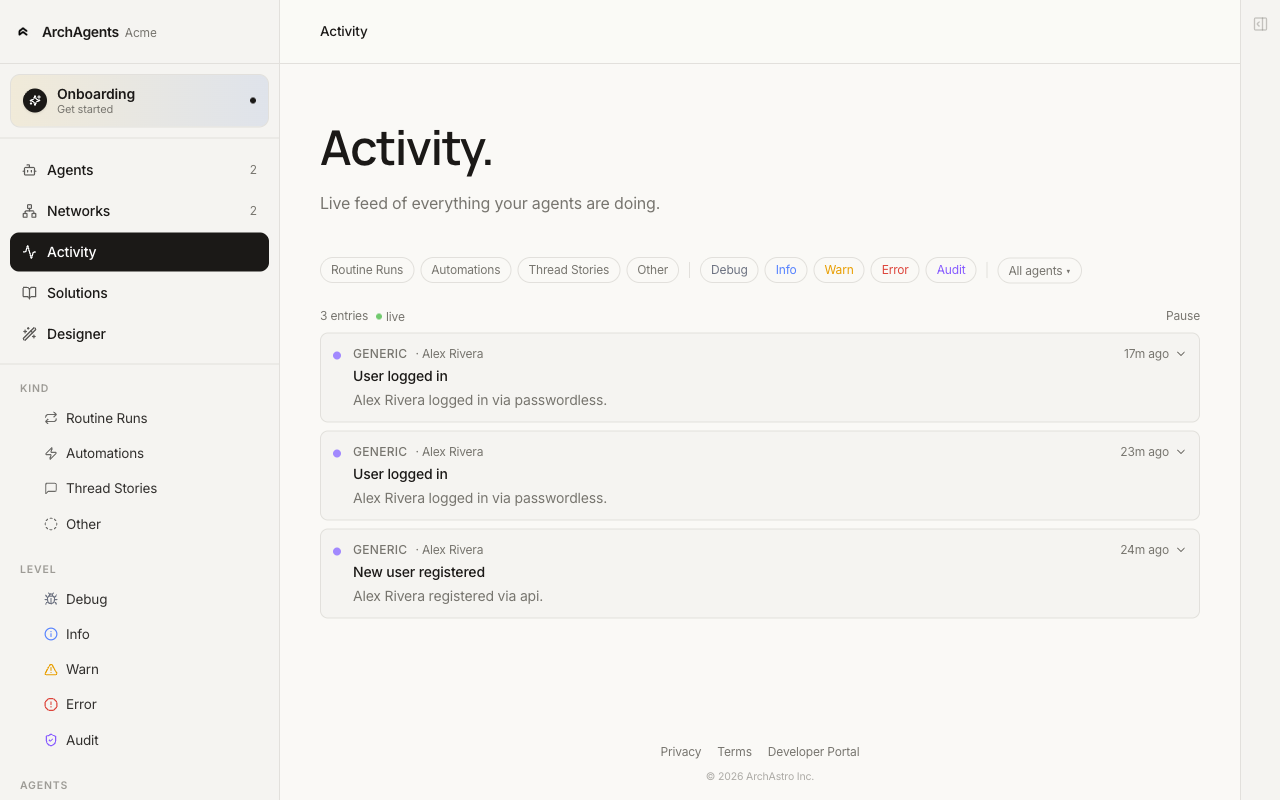
The chips split into two rows:
- Kind: Routine Runs, Automations, Thread Stories, Other.
- Level: Debug, Info, Warn, Error, Audit.
Plus an All agents dropdown to scope to a single agent without leaving the page. The left rail mirrors these as a sticky group when you want to keep filters visible while scrolling.
Each entry expands inline to show its full content, attachments, and links to the routine run, thread, or session that produced it. The feed updates in real time; new entries appear at the top as they happen.
Common patterns
Triage failed routine runs
archagent list activity --kind routine_run --level error
archagent describe activity <entry_id>
The error entry contains the failure reason, the routine run ID, and the thread or session it was working on. Open the linked run for the full execution detail.
Watch a scheduled automation execute
If you have a daily report automation that should run at 9am, attach to the org stream just before:
archagent run activity --org <org_id>
You'll see the automation start entry, any intermediate routine runs it kicks off, and the completion entry, in the order they happen.
Audit connector reauthentication
Connector lifecycle events (disconnected, token_refreshed, reauth_required) appear as generic entries. Filter by level when you want to know what's broken:
archagent list activity --level warn
archagent list activity --level error
A reauth_required entry tells you which integration needs attention without having to inspect every connector individually.
Cross-organization audit
Activity feed entries respect organization and team boundaries. When organizations collaborate through a network (see Network), each side sees only the entries that belong to its own org or to the network, never another organization's private activity.
Where the feed comes from
You don't write to the feed directly. The platform writes entries automatically when:
- a routine run starts, completes, or fails
- an automation run starts, completes, or fails
- a connector is connected, disconnected, refreshed, or needs reauthentication
- a sign-in succeeds or fails (audit level)
The titles and content come from the work the platform was doing, the routine name, the automation name, the connector that changed state. You shape what shows up in the feed by shaping the routines and automations themselves: clear names, focused responsibilities, and meaningful failure messages all surface here.
Where to go next
- Portal: review activity in the workbench.
- Automations: schedule the work that fills the feed.
- Agents: the routines whose runs become activity entries.
- Network: how cross-org activity stays scoped.
Have feedback?
Help us make this page even more useful.
Tell us what you'd like to see expanded, which examples would help, or what workflow you want covered next. Every message gets read.