
Key-Value Storage
Small, structured state that an agent or workspace needs to remember between runs, without sending it through an LLM turn.
Overview
Key-value storage is for the small, structured state your agent or workspace needs to keep between runs.
Use it when something is true and worth remembering, but does not belong in conversational memory or in a config file:
- a dedupe marker so the agent does not act twice on the same input
- a counter, a last-seen timestamp, or a "last deploy SHA"
- a short flag that another script needs to read on the next run
- the result of a one-off lookup you do not want to repeat
Key-value storage is deterministic. You read what you wrote. There is no LLM in the loop.
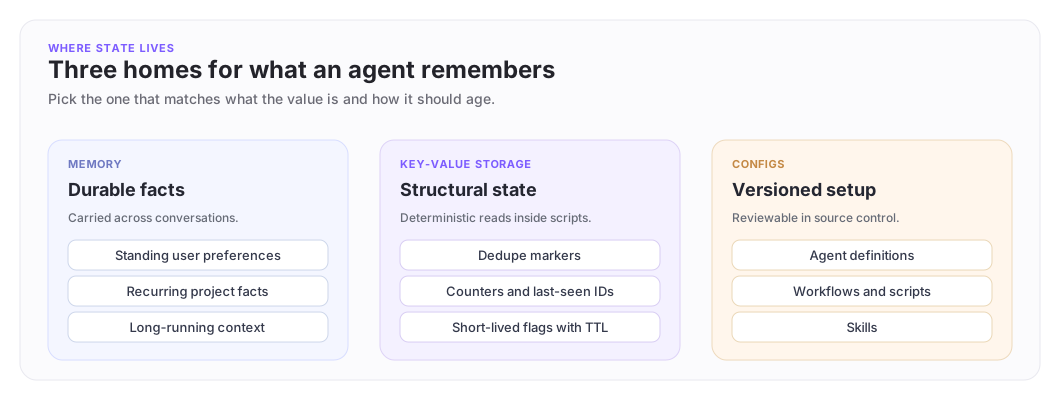
Memory, key-value storage, and configs
Each home for state has its own job. The shape of what you are storing tells you which one to reach for.
When to use it (and when not to)
| Use key-value storage for | Use Agent Memory for |
|---|---|
| Structural state, flags, counters, IDs, hashes | Durable facts the agent should know across conversations |
| Logic that needs an exact value back | Soft context like preferences or recurring project facts |
| Cheap, fast reads inside scripts | Information the agent uses to behave more consistently |
If the value is something a teammate would expect the agent to "remember," it probably belongs in memory. If it is something the agent's own logic needs to look up to do its job, it belongs in key-value storage.
For project-wide configuration that should be reviewable in source control, reach for Configs instead.
In scripts: the storage namespace
Inside a script, the storage namespace gives you read and write access to the calling agent's own bucket.
let storage = import("storage")

// Has this PR already been reviewed?
let existing = storage.get("pr_" + prNumber.toString() + "_reviewed")
if existing.ok {
 return "SKIP"
}

// Remember the deploy we just acted on
unwrap(storage.set("last_deploy_sha", commitSha))

// Mark a transient flag that expires
unwrap(storage.set("alert_sent", "true", { remember_until: "1 day" }))
The available functions are:
| Function | Returns | Notes |
|---|---|---|
storage.get(key) |
Result with {key, value} or not-found |
Use for full reads |
storage.set(key, value) |
Result with {key, value} |
Upsert. Adds or replaces |
storage.set(key, value, { remember_until }) |
Result with {key, value} |
TTL form. See remember_until below |
storage.exists(key) |
Result with boolean |
Cheaper than get when you only need a yes/no |
storage.delete(key) |
Result with {deleted: true, key} |
Removes the entry; not_found if there was none |
storage.list() |
Result with {entries, count} |
Returns this agent's full bucket |
remember_until accepts "1 hour", "1 day", "7 days", "14 days" (default), "30 days", "forever", or an ISO 8601 timestamp. Values without an explicit remember_until use the default of 14 days.
The script must be running in an agent context (the viewer needs to be an agent). Routine handlers and workflow-attached scripts already meet that requirement.
In the developer portal: browse and edit
The developer portal exposes the KV store under Dashboard -> Apps -> your app -> Storage -> Key-Value. From there you can:
- search by key prefix or by user
- inspect a value, including its expiry
- create, edit, or delete entries by hand
Reach for it when you're debugging: to confirm a flag was actually set, clear a stuck dedupe marker, or seed a value for a test.
From the SDK
The developer SDK exposes the same store programmatically, useful when your workspace needs to read or write entries on behalf of a specific user.
import { DeveloperPlatformClient } from "@archastro/developer-platform-sdk";

const archastro = new DeveloperPlatformClient({ accessToken: process.env.ARCHASTRO_ACCESS_TOKEN });

// List entries for one user
const page = await archastro.kv.list(appId, { user: userId });

// Read or write a single entry
const entry = await archastro.kv.upsert(appId, userId, "feature_flag.beta", { value: "true" });
This is the right surface when the value is set or read by your product code rather than by an agent script.
A practical pattern
A daily release-notification automation can use storage to make sure the agent does not double-post:
- Each morning, the automation reads
last_announced_releasefrom storage. - If the latest release matches, the automation returns early.
- Otherwise it posts the announcement and writes the new value back.
That is the whole job: one read, one comparison, one write. The agent stays deterministic, the channel does not get spammed, and a human can inspect the value in the portal at any time.
Best practices
A good key-value setup is:
- specific: keys describe what is stored, not where it came from
- bounded: values are short, structured, and rarely larger than a few hundred bytes
- intentional: every write has a clear reason, every read has a clear use
- reviewable: a teammate can look at the keys in the portal and follow the agent's logic
Avoid using key-value storage as a general document store or a fallback for things that should live in Knowledge. The store is small on purpose.
Where to go next
- Agent Memory: when "remember this fact" is the right framing instead of "store this value."
- Scripts: the surface where most key-value reads and writes live.
- Configs: for setup that belongs in source control rather than a runtime store.
Have feedback?
Help us make this page even more useful.
Tell us what you'd like to see expanded, which examples would help, or what workflow you want covered next. Every message gets read.