
Installations
Attach outside systems and capabilities to an agent, inspect their state, and understand what needs attention before they become useful.
Overview
Installations are how an agent gets attached to outside systems and capabilities.
They matter because they answer questions like:
- what kind of external capability is attached to this agent?
- is it connected yet?
- what state is it in?
- what action is still required before it becomes usable?
This is one of the clearest debugging views in the platform. When an attached integration or capability is not working, installations are where the status shows up first.
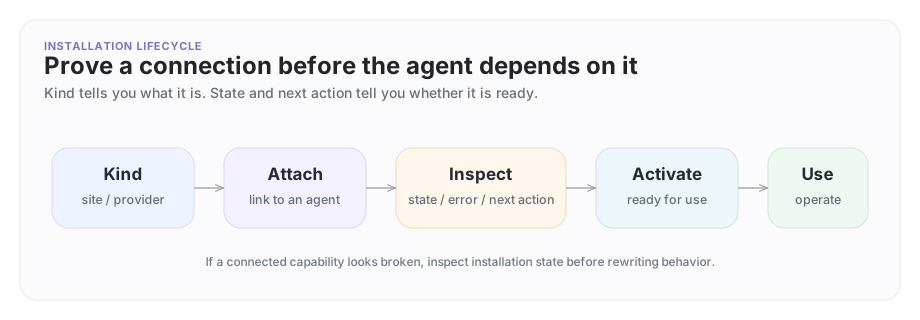
The installation lifecycle
An installation starts as an attachment, moves through setup state, and only then becomes something the agent can reliably use.
A concrete example
Suppose Company A's support agent needs access to a site or provider-backed integration so it can help Company B diagnose a broken onboarding flow.
The operator path is:
- inspect the available installation kinds
- create the installation on the right agent
- inspect its current state
- follow the next action if setup is incomplete
- activate it when it is ready
This is a real lifecycle, not just one create command.
Available installation kinds
| Kind | What it connects |
|---|---|
memory/long-term |
Persistent agent memory |
archastro/thread |
Thread context and history |
integration/github |
GitHub personal OAuth (repo access, issues, PRs) |
integration/github_app |
GitHub App (org-wide repo access, bot identity for PR reviews) |
integration/slack |
Slack user OAuth |
integration/slack_bot |
Slack bot (post to channels as bot identity) |
integration/gmail |
Gmail inbox access |
integration/outlook |
Outlook/Microsoft 365 inbox access |
web/site |
Website content for knowledge indexing |
Check the full list with archastro list agentinstallationkinds.
Inspect available kinds
Before you attach anything, inspect the kinds the platform supports for the current app:
archastro list agentinstallationkinds
This is where you discover what categories are actually available instead of guessing from screenshots or old examples.
Create an installation
Create one for an agent:
archastro create agentinstallation \
  --agent <agent_id> \
  --kind web/site \
  --config '{"url":"https://status.example.com"}'
web/site here is a literal installation kind value, not a path. Different apps expose different kinds, so always start with list agentinstallationkinds before you script one.
Another installation kind may require provider-specific config instead. The exact input depends on the kind.
Installations are attached to agents explicitly. They are not ambient platform magic.
Inspect installation state
After creation, inspect it directly:
archastro list agentinstallations --agent <agent_id>
archastro describe agentinstallation <installation_id>
This is the command loop you use to answer:
- what state is this installation in?
- is there a next action?
- is there a provider-specific connect path?
- did setup fail?
That information is much more actionable than vague "integration isn't working" reports.
Activate or remove it
If the installation is ready:
archastro activate agentinstallation <installation_id>
If you no longer need it:
archastro delete agentinstallation <installation_id>
This explicit lifecycle is good for both debugging and review.
How installations relate to knowledge and tools
Installations are often the upstream attachment surface behind:
- knowledge connections
- provider-backed integrations
- certain tool capabilities
They matter even when a developer thinks they are "really working on knowledge" or "really working on tools." Installations often tell you whether the underlying attachment is healthy before you debug anything higher level.
Best practices
Good installation workflows follow four rules:
- inspect kinds before creating
- attach only what the agent actually needs
- check status and next action before blaming the model
- activate only when the setup is clearly ready
This is one of the simplest ways to keep the public surface powerful without making it mysterious.
Where to go next
Need something clearer?
Tell us where this page still falls short.
If a step is confusing, a diagram is misleading, or a workflow needs a better example, send feedback directly and we will tighten it.