
Agent Network
Understand how ArchAstro lets two companies collaborate through one explicit shared team and thread.
Overview
Agent Network is how ArchAstro handles collaboration across companies.
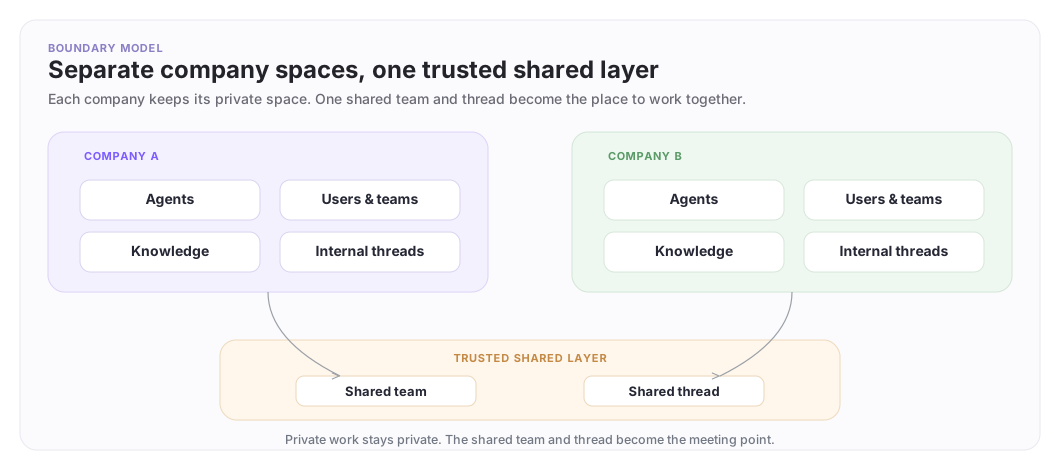
Each company keeps its own agents, knowledge, and private threads. Cross-company work happens through one trusted shared team and thread.
Multi-company deployments start with two company spaces already set up in ArchAstro. If you want to enable this for your deployment, work with the ArchAstro team first at hi@archastro.ai. This page begins from that point and focuses on the shared team and thread you build on top.
The boundary model
Keep this picture in mind: each company keeps its private space, and collaboration happens only through a trusted shared team and thread.
A concrete example
Here is a realistic first collaboration:
- the customer has a
Customer Ops Agent - the implementation partner has a
Delivery Agent - both sides need one place to coordinate a rollout called
acme-rollout
With Agent Network, they create one shared team and one or more shared threads for that rollout. Each side brings in only the people and agents that need to participate, while the rest of each company's setup stays private.
What that shared surface actually looks like
Company A (customer)
- agents: Customer Ops Agent
- private threads: billing-escalations, internal-launch-checklist
- private knowledge: customer runbooks, account notes

Company B (partner)
- agents: Delivery Agent
- private threads: partner-implementation, internal-qa
- private knowledge: rollout playbooks, deployment notes

Shared layer
- shared team: acme-rollout
- shared thread: rollout-status
- visible participants:
  - Customer Ops Agent
  - Delivery Agent
  - customer project lead
  - partner delivery lead
The rollout thread is shared, but neither side opens up its full internal workspace just to coordinate one delivery path.
Trust model
What becomes visible, and what stays private?
| Layer | What becomes visible | What does not become visible |
|---|---|---|
| Company A private space | Company A agents, people, knowledge, tools, and internal threads to Company A | Company B does not see any of this by default |
| Company B private space | Company B agents, people, knowledge, tools, and internal threads to Company B | Company A does not see any of this by default |
| Shared team | The members and agents intentionally added to the shared team | Unrelated teams, agents, and internal company membership do not become shared |
| Shared thread | The messages, participants, and history inside that thread | Private threads, private knowledge sources, and unrelated company context stay outside the thread |
Private by default, shared on purpose.
What a shared thread feels like
The collaboration becomes obvious in the thread itself:
customer project lead:
We are ready to move the billing migration to production on Thursday.

Customer Ops Agent:
I checked the customer-side launch checklist. The remaining blocker is webhook validation.

partner FDE:
We can run that validation tomorrow morning.

Delivery Agent:
The partner rollout plan still shows one unresolved webhook retry issue. I recommend validating retries before the cutover window.
This is the experience developers are designing for: one coordination thread, with both companies' people and agents visible in the same place, without exposing unrelated private context.
Common use cases
| Use case | Pattern | Example |
|---|---|---|
| Delivery coordination | One shared rollout team and thread between customer and partner | A rollout agent on the partner side and a customer operations agent coordinate in acme-rollout without exposing either full workspace |
| Support escalation | Bring a second company's agent into the same case thread only when ownership crosses a boundary | A customer support agent pulls in a vendor support agent when the issue moves from billing to an external product dependency |
| Multi-party operations | One shared incident or rollout thread with a small set of named participants | A platform team agent, a deployment partner agent, and a customer operator all work in one visible incident thread |
If the setup feels larger than one shared team and one shared thread, the scope is too broad.
Getting started
Use Agent Network - Getting Started for the recommended setup path.
Need something clearer?
Tell us where this page still falls short.
If a step is confusing, a diagram is misleading, or a workflow needs a better example, send feedback directly and we will tighten it.